iOS 17+ · iPhone and iPad
See what's beneath any website.
View source, a touch-first inspector, and the real Chrome DevTools, running on your iPhone. No Mac, no cable.
No accounts, no analytics, no third-party SDKs.
Mobile Safari has no view-source
There is no way to read the markup of a page on your phone. Web Inspector exists, but it needs a Mac, a cable, and the patience to plug in. So the moment you actually care, when someone sends you a link, a page looks wrong, or a script is misbehaving, you either write it down for later or you give up.
Beneath is for that moment. It opens any page and shows you what actually shipped: the bytes on the wire against the DOM after JavaScript ran, the CSS rule that wins, the request that failed, the cookie that got set.
View source, three ways
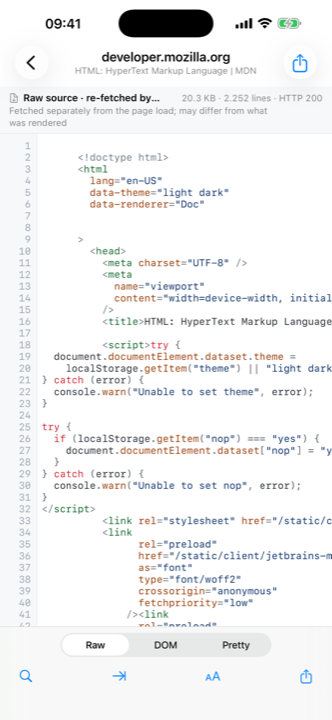
Raw is the bytes, re-fetched with the page's own cookies and user agent, with status, headers and the full redirect chain. DOM is the live document as it stands right now. Pretty indents either one. Every view is labelled with where it came from, so you always know which you are reading.
An inspector built for fingers
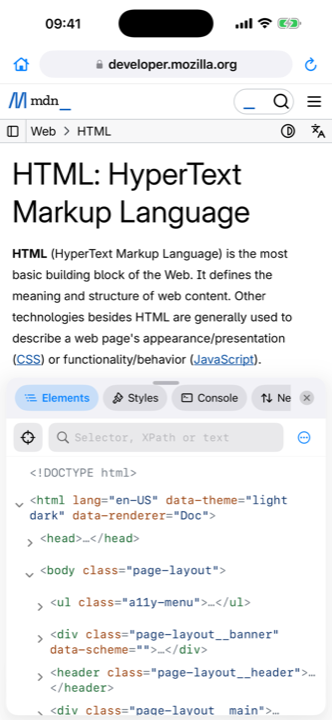
Elements, Styles, Console, Network, Storage, Resources and Info, as a native panel. Big tap targets, sheets you can drag, and an element picker that collapses out of the way while you point. A sheet on iPhone, a resizable side column on iPad.
Pro: the real DevTools
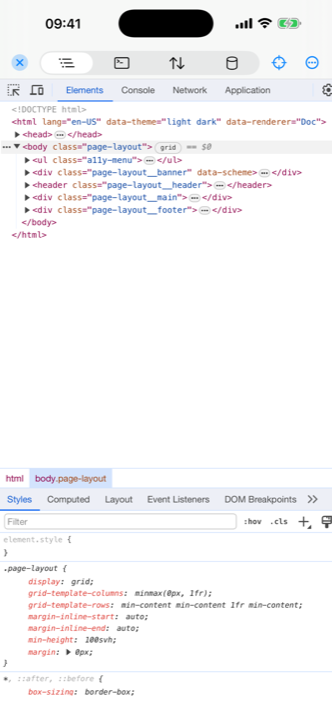
The actual Chrome DevTools frontend, running in-app against the live page. Elements, Console, Network and Application, with touch shims for long-press context menus and automatic reattach when the page navigates. Part of the one-time Pro unlock, and off until you ask for it because it costs memory on every page while armed.
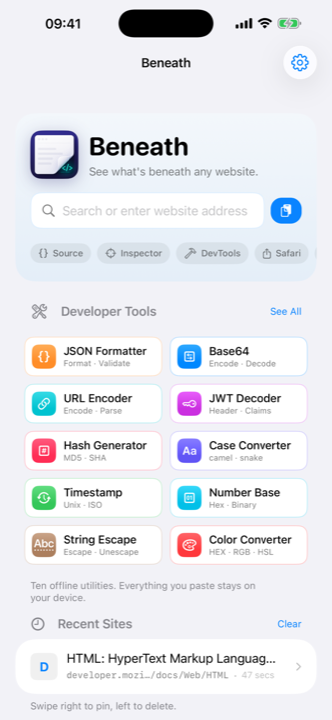
Ten developer tools built in
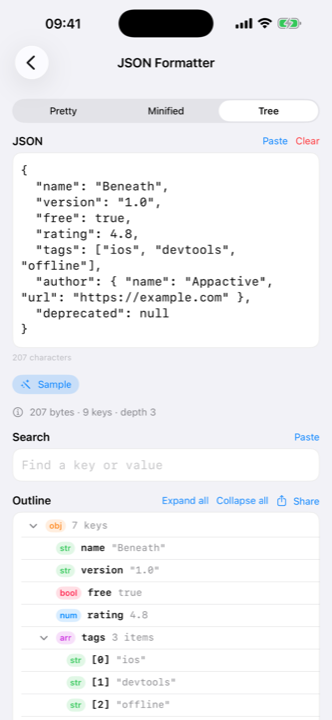
The conversions you reach for while reading a page, in the same app as the page. JSON, Base64 and URL encoding are free. A JWT decoder, hash generator, case converter, timestamp converter, number base converter, string escaper and colour converter come with Pro.
Straight from Safari
A View Source in Beneath action in the share sheet captures the live DOM of whatever you are reading, highlights it right there in the sheet, and hands it to the app in one tap. Captures wait for you on the start screen.
What you actually get
- Console. Every level, expandable objects, errors with stacks and tappable DOM nodes,
all free. Pro adds the evaluation prompt, with
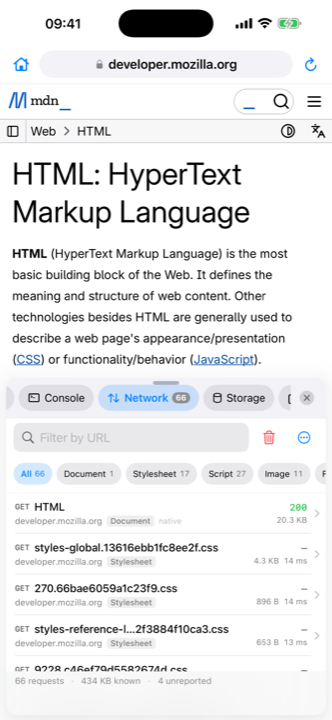
$0 $_ $ $$ $x copyand top-levelawait. - Network you can act on. Fetch, XHR and WebSocket hooks alongside Resource Timing and native document responses. The list, filters, search and re-fetch are free. Pro opens each request: headers, bodies, timing, WebSocket frames and Copy as cURL.
- Storage you can read and edit. Cookies including HttpOnly, read natively, plus Local and Session storage, IndexedDB and Cache names and quota, all free. Clear site data is free too. Pro adds adding, editing and deleting entries.
- Styles that explain themselves. Matched rules with their
@mediaand@layercontext and source, searchable computed styles, and a box-model diagram. - A source viewer that does not choke. Syntax highlighting for HTML, CSS, JavaScript, JSON and XML, line numbers, soft wrap, find with match counts and a gutter tint, jump to line. Multi-megabyte documents stay smooth.
- A real browser around it. Back and forward, pull to refresh, desktop-site toggle, find on page, downloads, and long-press any link for Open / View Source / Copy / Share.
- iPad, properly. Page and inspector side by side with a draggable divider, and keyboard shortcuts: ⌘L for the URL bar, ⌘R to reload, ⌘F to find, ⌘⌥I for the inspector, ⌘⌥U for source.
Free, with one optional unlock
Beneath is free to browse with, and free to read with. Opening pages, raw and DOM source, response headers and the redirect chain, the elements tree, matched CSS rules, the list of network requests, cookies and storage, the resources list, the Safari share-sheet capture and three of the ten tools all cost nothing.
A single one-time Beneath Pro unlock adds the parts that change things or dig deeper:
- Full request details, including bodies, timing and WebSocket frames
- Editing the page, its attributes and HTML
- Running JavaScript in the Console
- Editing storage and cookies
- The real Chrome DevTools panels
- Copy as cURL
- The other seven tools
Beneath Pro is €9.99, paid once. Apple sets the equivalent in your own currency, so the App Store is the authority on what you will actually pay. There is no account, and the one-time unlock is the default. An optional yearly plan can also be offered, but nothing requires a subscription.
Chrome DevTools, on the iPad itself
Ask the internet whether you can run Chrome DevTools on an iPad and the answer is no. Get a Mac, plug in a cable, use Safari’s Web Inspector. Or run a desktop tool that debugs the device remotely. Either way the DevTools window lives on a computer and the iPad is the thing being inspected.
Beneath turns that around. The real Chromium DevTools frontend runs on the device, against the page in front of you. Elements, Console, Network and Application, the genuine panels, with no Mac, no cable and no network connection once the page has loaded.
It works because the DevTools frontend is a web application that talks to what it inspects over a message protocol rather than a private browser API. So Beneath carries the frontend in the app bundle, keeps your page in a second web view, and passes the protocol messages between them natively.
You open the page in Beneath rather than attaching to a Safari tab. That costs less than it sounds, because Apple requires every iOS browser to use WebKit, so Beneath renders your page on the same engine Safari would. Same engine, real tools, no second machine. The full picture, including where the Mac route is still the right answer, is in Chrome DevTools on iPad and iPhone.
And the rest of it
Raw source is a replay. The request is re-issued carrying the page’s own cookies and user agent, so what you read is what the server would have sent you. When the replay disagrees with what the page actually received, which is what happens behind bot walls, Beneath re-fetches from inside the page and says so on the banner.
The source viewer does not choke. Multi-megabyte documents stay smooth because only the visible part is laid out and highlighting happens off the main thread.
Nothing is bolted on. There are no Swift dependencies. The only third-party code is vendored JavaScript, pinned by version and checksum, and the build fails if it goes missing.
What it does not do
Worth knowing before you install it:
- Raw source is a replay, so sites keyed on one-time tokens may answer differently. The banner always tells you which source you are reading.
- POST results are never re-fetched, because that would repeat the submission. You get the live DOM with a badge instead.
- Pro mode is a tax on every page while it is armed. Reload to reclaim memory, and turn it off when you are done.
- A strict
script-srcwithoutunsafe-evalblocks the REPL’seval. The error says so. The agent itself is a user script and keeps working. - Pages that replace
fetchorXMLHttpRequestafter load slip past the hooks. Resource Timing still lists the requests. - The source viewer caps at 30 MB. The share extension captures up to 12 MB, and drops highlighting above 512 KB to stay inside the extension memory limit.
- No Safari Web Extension in this version. The share-sheet action is the integration point.
How Beneath compares with other iOS tools
Beneath is not the only way to inspect a web page on an iPhone. If you are weighing the options, these comparisons use each app’s own App Store description and figures checked on 8 September 2026, and they say plainly where Beneath falls short.
- Beneath vs Web Inspector, the established free Safari extension with Elements, Console, Sources, Network and Resources.
- Beneath vs iDevTools, a €0.99 Safari extension offering a Chrome-like DevTools panel.
- Beneath vs Dev Tool Box, a free offline collection of JSON, Base64, JWT and hash converters.
- Beneath vs Exabox, more than 30 offline utilities including a REST client and regex evaluator.
Start with the comparison index for a table of all four side by side, or read Chrome DevTools on iPad and iPhone for how on-device DevTools compares with the Mac and desktop-tool routes.
Privacy
Beneath sends nothing to AppActive. There is no analytics endpoint, no crash reporter and no remote configuration, so there is no telemetry to opt out of.
It is a browser, so it does make requests. They go to the site you are looking at, carrying that site’s own cookies, whether that is loading the page, re-fetching its raw source, or resolving a cross-origin stylesheet. The one exception is search: type something that is not a URL into the address bar and the query goes to DuckDuckGo.
Captures from Safari live in the app’s private container and are pruned automatically, newest twenty or seven days. The ten built-in tools never touch the network at all.
There are no accounts, no analytics and no third-party SDKs. Full detail is in the Beneath privacy policy.
Specifications
- Platform
- iPhone and iPad, iOS 17 or later
- Version
- 1.0, released 14 September 2026
- Download size
- 27.4 MB
- Age rating
- 17+, for unrestricted web access
- Price
- Free to download
- Beneath Pro
- Optional one-time unlock, see pricing above
- Built-in developer tools
- 10, of which 3 are free
- Swift dependencies
- None
- Telemetry sent to AppActive
- None
- Source viewer limit
- 30 MB documents
- Licences
- chobitsu (MIT), chii and Chromium DevTools (MIT, BSD-3-Clause)